Attendance
At a glance
Section titled “At a glance”Attendance shows, for each employee, where they stand today: working, on a break, done for the day or without any time yet. Use it to see who is in right now and to jump to an employee's time logs.
The screen
Section titled “The screen”At the top are four counts. Under them are a search box and two filters. The table has one row for each employee. You need the permission to view attendance to see this screen.
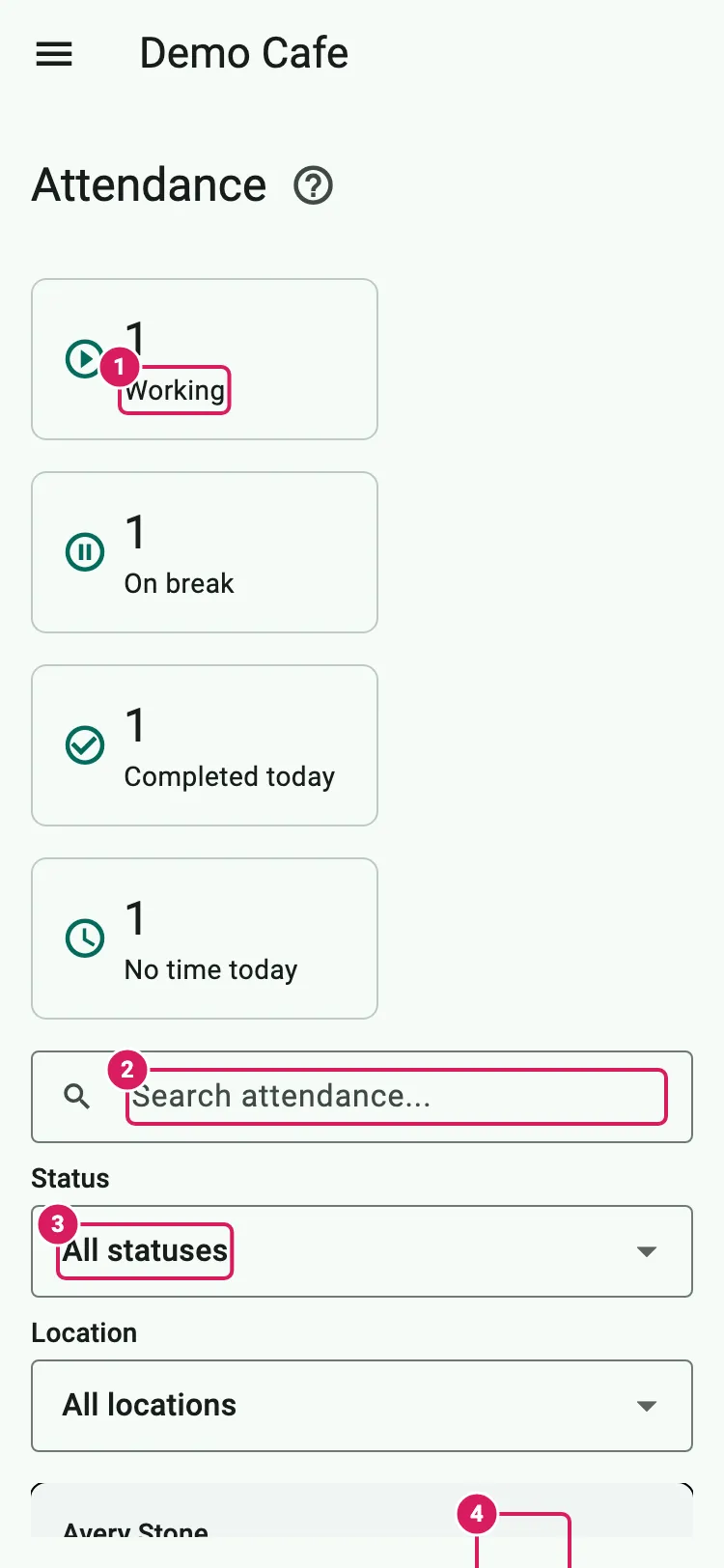
Parts of the screen
Section titled “Parts of the screen”- The Working count: the first of four counts, with On break, Completed today and No time today.
- The Search attendance... box finds an employee by name.
- The All statuses filter limits the rows to one state.
- The View time logs button on a row opens Time Logs.
Options and filters
Section titled “Options and filters”- Search by name. The search is not case-sensitive.
- Status limits the rows to one of Working, On break, Completed today or No time today.
- Location limits the rows to one location. Its first choice is All locations.
- Touch a column title (Name, Status) to sort. The table opens sorted by name.
Actions
Section titled “Actions”- View time logs opens Time Logs.
- More actions is the menu of a row, for managers who may edit time. For an employee with a shift it offers Fix clock-in, Fix clock-out, Add break, Remove break and Void punch. For every employee it offers Add Missing Day. Each of them asks for a reason.
Colours, icons and badges
Section titled “Colours, icons and badges”- The four counts have an icon each. A row shows the state in a badge with a word: Working, On break, Completed today or No time today. The word is always there, never only the colour.
- Current duration shows how long the shift has run, or the break while the employee is on one; it shows a dash for an employee who is clocked out.
- A row marked Self-edit was approved by the person it is about, because no other manager could.
Phone and desktop
Section titled “Phone and desktop”On a phone each employee is a card with the state, the last activity and the location. On a desktop the table shows the name, the state, the last activity, the current duration and the location. On a narrower screen it shows fewer columns, and the rest are in the details of the row.
Common questions
Section titled “Common questions”What is the difference between Completed today and No time today? Both mean the employee is clocked out. Completed today means the last punch was today; No time today means it was not. "Today" is the company's date at the company's place, the same on every screen, not the date of the device you are using.
The list is empty. The page says "No attendance records yet." when there is nothing to show, and "No attendance records match your filters." when the search or a filter hides every row.
How do I fix a punch from here? Open More actions on the row and pick the edit. See Fix a shift.