Settings
At a glance
Section titled “At a glance”Settings is the front door to the setup of your company: places, positions, kiosks, payroll rules, employee access and the export of your data. Use it to find a setting by its name, and to change the language of the app.
The screen
Section titled “The screen”At the top is the language choice. Under it is a search box. Then come the settings, in groups, each one a card with a title, a short description and an arrow. Touch a card to open that setting. You see only the cards for which you have the permission.
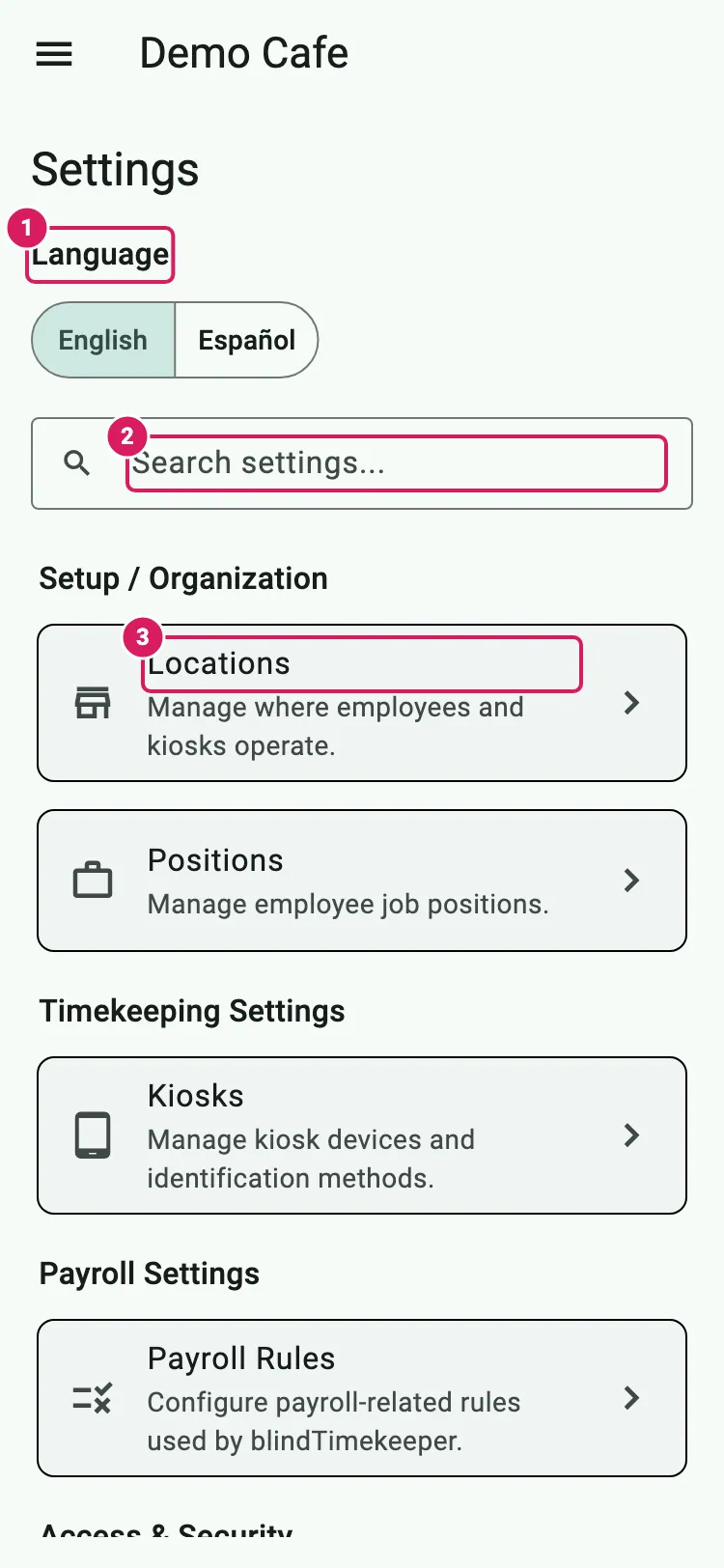
Parts of the screen
Section titled “Parts of the screen”- The Language choice switches the app between English and Spanish.
- The Search settings... box filters the cards as you type.
- The Locations card is an example of a setting: it opens that page.
Options and filters
Section titled “Options and filters”- The search looks in the title, the description and some extra search words of each card, and ignores upper and lower case. For example "overtime" finds Payroll Rules.
- The groups are Setup / Organization (Locations and Positions), Timekeeping Settings (Kiosks), Payroll Settings (Payroll Rules), Access & Security (Employee Access) and Data (Data & Export). A group with no card for you is not shown.
Actions
Section titled “Actions”- Touch a card to open its page. See Locations, Positions, Kiosks, Employees (the page behind Employee Access) and Data & Export.
- Two settings live inside a page, not on a card of their own: the second approver and the country are in Payroll Rules, and the offline punches are in Kiosks.
Colours, icons and badges
Section titled “Colours, icons and badges”Each card has an icon and a title. Nothing here uses a colour to carry a meaning.
Phone and desktop
Section titled “Phone and desktop”On a phone the cards use the whole width. On a desktop the same page opens next to the menu and the search box stays at a readable width.
Common questions
Section titled “Common questions”A card is missing. Cards depend on your permissions. Ask an owner to give you the permission for that part of the setup.
The search says "No settings match your search." Try one word, or clear the box.
Does the language change for everyone? No. The choice is remembered on this device only, and each person chooses their own.